The OnePlus Watch 3 feels like a course correction rather than a reinvention. It doesn't chase trends or overwhelm with gimmicks. Instead, it leans into daily utility, practical design, and consistency. For anyone looking for a smartwatch that behaves like a helpful extension of the phone — without trying to replace it — this model finds a steady middle ground. It brings enough improvements to matter but keeps the interface predictable. The shift is less about flash and more about fixing friction points from earlier versions. Here’s a look at 4 features that stand out in real-world use.
Dual-Chip Architecture That Actually Matters
The OnePlus Watch 3 isn’t the first smartwatch to include a dual-chip setup, but it’s one of the few where the execution doesn’t feel like a half-measure. It combines a power-efficient RTOS-based chip for standard operations with a more capable chip that handles heavier tasks like app usage or animation-heavy transitions. The watch intelligently switches between them based on what's happening on screen.

This impacts more than just battery life. In daily use, the transitions feel smoother during mixed activity — switching from checking messages to tracking a run doesn’t introduce lag. The watch keeps the display live and the sensors running without draining too much in the background. During a six-day business trip that involved daily workouts, navigation use, and dozens of notification checks, the watch didn’t need a recharge until the flight home. For anyone tired of nightly recharges, this setup removes that constant low-battery anxiety.
One limitation worth flagging: third-party apps still rely on the more power-hungry chip, so extended use of those (like a GPS-heavy running app or map navigation) will eat through battery faster. The balance holds up well when sticking with native tools, but the efficiency does drop if the usage leans heavily into external app ecosystems.
The switching between chips is seamless enough that you don’t think about it much. That’s part of the point. Most users don’t care what processor is running — they just want the watch to stay responsive and last through a busy week. In this case, it does both, without needing battery-saving mode micromanagement.
Always-On Display That Doesn’t Kill Battery
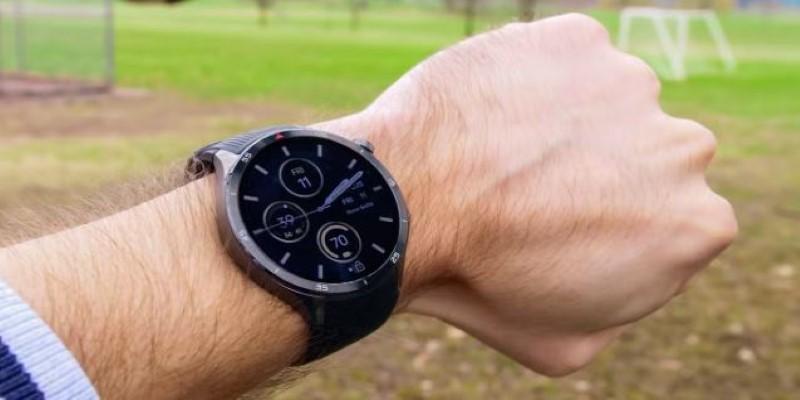
This feature was long overdue. The original OnePlus Watch skipped it entirely, and the Watch 2 treated it as more of an optional side feature. Here, it finally feels fully integrated. The always-on display is crisp, responsive, and consistent, even in outdoor lighting.
It’s useful in more than just glancing at the time. During workouts, the display stays live without needing a wrist flick, which helps when cycling, rowing, or lifting weights. It’s equally helpful in office settings, where a quick glance doesn’t feel disruptive. Unlike older versions, it no longer auto-disables without warning to conserve battery.
What helps is how the dual-chip system supports it. The low-power chip handles the always-on display without needing to light up the full AMOLED panel at full brightness. That gives it a passable battery trade-off. In testing across several days of mixed use — workouts, notifications, and always-on display active from morning to night — the watch still lasted around four days before needing a top-up.
It’s still not deeply customizable. Users looking for rich third-party watch faces or animated designs will find the always-on options limited. But for the core use cases — clarity, reliability, low impact on battery — it delivers.
OxygenOS Watch Edition Feels Cohesive, Not Cluttered
OnePlus built a separate version of its operating system for the Watch 3, and the changes are easy to spot. Layouts are cleaner. The swipe gestures work consistently, even on the smaller display. Quick toggles for volume, brightness, and notifications are just a swipe away.
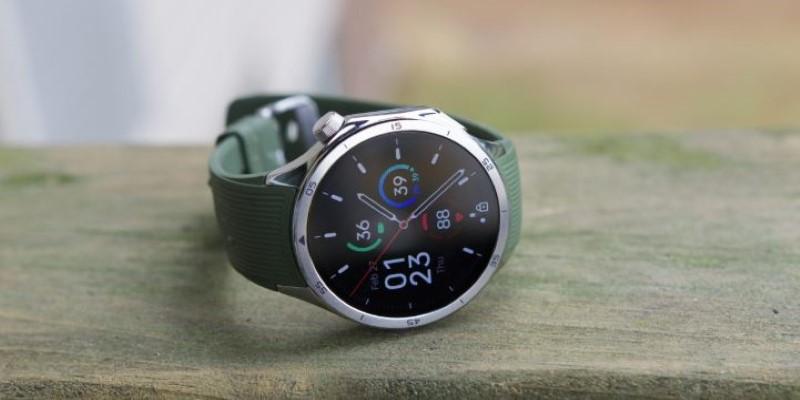
Workout tracking is where this update stands out. Start a workout, and you’re met with large, clear metrics in separate cards instead of one cluttered screen. Heart rate, step count, distance, time, and calories each have space to breathe. Swipe left or right, and everything updates smoothly. This avoids the squint-and-scroll issue many watches fall into when trying to fit everything on one screen.
Navigation in general is more polished. Instead of diving through submenus to find a setting or app, most of the frequently used functions are right there on the top layer. It makes the whole system feel faster and more deliberate.
There are still quirks. If you’re trying to use third-party music apps, for example, the controls aren’t always consistent. The OS is clearly designed to work best with OnePlus’s own ecosystem and certain Android defaults. For anyone outside of that space, there may be some trial-and-error with setup.
Health Sensors That Don’t Just Check Boxes
Every smartwatch claims to track health, but not all of them follow through in day-to-day use. The OnePlus Watch 3 takes a more refined approach. Instead of adding new sensors for the sake of it, the focus stays on improving the accuracy and visibility of what’s already there.
Heart rate tracking, especially during workouts with changing intensity, is more consistent. Interval runs and strength sessions register cleanly, without erratic spikes or missing data. Sleep tracking has improved as well. Stages like light, deep, and REM are presented with clearer graphs, and long periods of stillness are less likely to be mislabeled as sleep.
The blood oxygen sensor runs passively overnight without manual activation. That helps when keeping an eye on SpO2 dips tied to snoring or altitude changes. Stress tracking stays in the background, offering context without constant prompts.
Limits remain. There’s no ECG, and recovery metrics don’t match fitness-first brands like Garmin. The OnePlus Health app also lacks full regional integrations. Still, for everyday wellness tracking, it covers the essentials in a clean, readable way.
Closing Thoughts
The OnePlus Watch 3 doesn’t try to be the most advanced watch on the market. It doesn’t load up with niche features or force itself into every part of your life. It gets the daily things right — display, navigation, health basics, and battery — and skips the unnecessary flourishes. Over time, that makes it easier to rely on. You don’t have to learn it, manage it, or babysit its battery. You just wear it, check it, and move on. For people wanting their smartwatch to be useful without being demanding, this one finds the rhythm. Not dramatic, not overbuilt, just easy to live with.