YouTube’s recommendation system learns from everything you do — every click, search, and view shapes what appears next. But the algorithm doesn’t always read the room. One random video or a short burst of curiosity can completely change your feed, filling it with things you don’t want to see. Luckily, YouTube offers enough control to steer it back on track.
Small adjustments in your settings can make a noticeable difference, helping the platform understand your true preferences. These simple changes refine your experience so your homepage finally reflects what you genuinely enjoy watching, not just what you happened to click once.
7 YouTube Settings Adjustments To Improve Recommendation Accuracy
Clear Watch and Search History to Reset Algorithm Drift
Over time, your history can misrepresent your interests. A few random clicks, curiosity-driven views, or shared links can nudge the algorithm in the wrong direction. When that happens, YouTube starts making assumptions that don't hold up.
Clearing your watch and search history resets those signals. You can do this from the YouTube History settings under your account. Choose to wipe everything or just remove specific videos that seem out of place. You don’t have to start from scratch — even cleaning up five or ten videos can help course-correct your feed. This is a reliable way to fix a feed that’s gone off-track.
Turn Off Watch History Temporarily When Exploring
Sometimes you're in the mood to explore something new or weird. The problem is, YouTube takes those one-time watches seriously. Even one video in a niche you're not interested in long-term can leave an imprint.
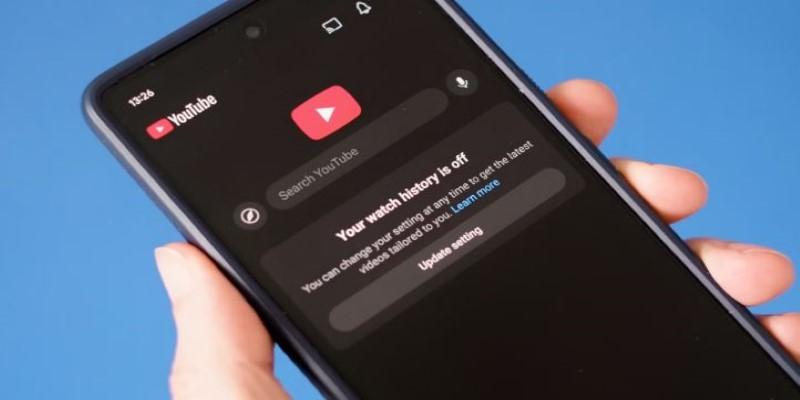
That’s why the "Pause Watch History" option exists. You’ll find it under "Manage All History." When enabled, YouTube won’t log anything you watch during that time. It’s a smart option when you’re browsing out of curiosity, helping keep your core recommendations clean. Use it when you know your current viewing doesn’t reflect what you want more of.
Use the “Not Interested” and “Don’t Recommend Channel” Buttons
You don’t have to silently scroll past videos you don’t care about. Every time you dismiss a video using the three-dot menu, you’re giving YouTube feedback that improves future suggestions.
The “Not Interested” option removes that specific video from your feed. The “Don’t Recommend Channel” choice goes further and tells YouTube not to suggest anything from that creator. These small actions make a difference. They don’t immediately overhaul your homepage, but they influence the system over time. Consistent use helps filter out channels and topics that don’t belong in your recommendations.
Fine-Tune Ads Personalization and Activity Settings
Your viewing suggestions aren’t shaped by YouTube alone. Google uses your broader activity — including what you search and interact with on other services — to personalize your YouTube feed.
In your Google account, check out the Ads Settings section. You’ll see a list of categories Google thinks you’re into. If something feels off, remove it. This doesn't just change what ads you see — it can subtly adjust the kind of videos YouTube puts in front of you.
You should also review the activity tracking options under "Data & Privacy." Controlling what Google logs about you gives you more consistent and relevant video recommendations.
Customize Your Homepage with Subscriptions
One of the most straightforward ways to guide the recommendation system is to be active with your subscriptions. Subscribing to channels you genuinely enjoy sends a strong signal about what you like to watch. But don’t stop at subscribing — watch those channels regularly, like videos, and comment when it feels natural.
This tells YouTube that this type of content is a priority. As you watch more from channels you follow, your homepage starts shifting in that direction. The subscriptions tab is also a good place to build your own viewing routine without relying on algorithm guesses.
Remove Specific Videos from Your History
Sometimes, all it takes is one video to throw your recommendations into a spiral. A viral clip, a one-time interest, or a borrowed account session can leave behind a misleading trace.
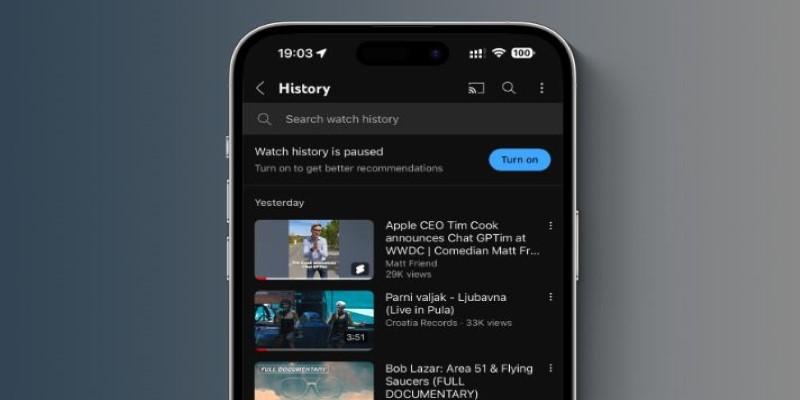
You can fix this without clearing your entire history. Just head to your YouTube History page and delete the specific videos that don’t match your usual interests. This sends a clear signal that those views were outliers. It’s quick, precise, and helps YouTube stop showing you content that doesn’t reflect what you actually like.
If your feed starts looking strange after watching something new, check your history and clean up right away.
Create Separate Profiles for Different Interests
Mixing very different types of content on one account can confuse the recommendation system. If you're using one profile to watch news, tutorials, family videos, documentaries, and entertainment, the feed can start to feel chaotic.
Creating separate YouTube or Google accounts for different viewing needs is an underrated fix. One for learning. One for work. One for casual viewing. It takes a bit of setup, but in the long run, each profile develops its own focused recommendation stream. That means fewer random suggestions and more consistency in what appears on each homepage, helping maintain clearer preferences and more accurate, personalized recommendations over time.
Conclusion
YouTube doesn’t always know what you want — it knows what you’ve clicked. That’s not the same thing. With a few well-placed settings adjustments, you can guide the system toward showing videos that actually interest you. You’re not stuck with a messy feed just because of one strange binge or an accidental click. The options to pause, reset, filter, and personalize your account are all there. Use them when your recommendations start missing the mark. The more intentional you are, the better YouTube becomes at offering content that feels worth watching. Over time, your choices refine the algorithm, shaping a feed that matches your true interests more closely and consistently.