iOS 26 is the kind of update that hides its best tricks under layers of menus. You can use the system for a week and still miss half of what changed. Some features reshape familiar habits. Others fix problems you thought you just had to live with. The list below calls out 26 features that make a difference in day to day use, especially once you understand the situations they are built for and the limits they still carry.
Live Status Widgets
Lock Screen widgets now adjust more quickly when apps send updated info. A rideshare widget shows a driver getting closer without waiting for the next scheduled refresh. It is helpful at airports and busy streets. Battery drain can increase on older phones because the system checks for updates more often.
Location Based Check In
Check In can trigger automatically when you arrive or leave a place. Someone who returns home late after shifts can have a quiet message sent to a family member without remembering to do it. Automation pauses if the phone has not been unlocked in a while, so it still relies on small signs of activity.
The Detailed Network Privacy Map
The privacy dashboard visualizes which servers an app contacts. It becomes obvious when a simple note taking app pings three analytics providers. The chart only keeps a week of history, so slow pattern app behavior is harder to spot.
Multi Page Control Center
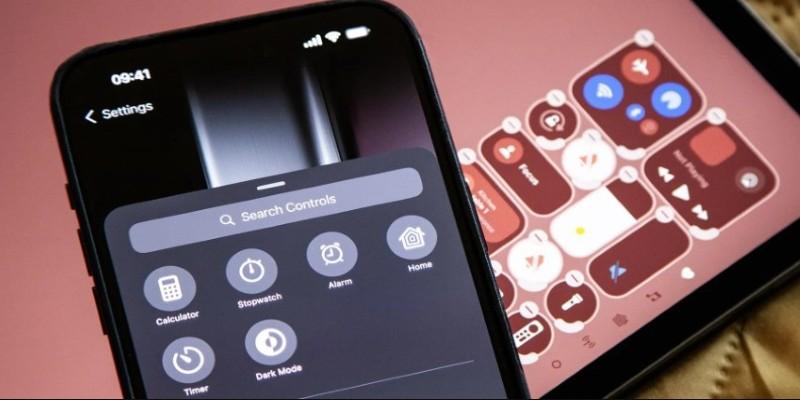
You can swipe between custom Control Center pages. One page can hold media controls, another home automation tools, another shortcuts you use during work. Some toggles still lack long press actions, which feels odd in a layout meant for quick control.
Notes Handwriting Capture
The conversion engine recognizes sloppy handwriting much better. People who annotate PDFs during meetings can convert the mess into text that becomes searchable. Symbols and multilingual phrases still confuse the model, so math heavy notes need manual edits.
Adaptive Dark Mode
Brightness and contrast shift based on where you are. Reading in a dim room feels gentler because the screen stops snapping into harsh blacks and whites. LCD devices show only a mild change, so it is most noticeable on newer OLED phones.
Satellite Messaging in Third Party Apps
Apps used by hikers and field researchers can send tiny messages when there is no cell coverage. A location ping or a short safety note can travel through satellite. Images and long text are blocked, so it is purely for essentials.
Priority Notification Tier
Some alerts jump through Focus modes. Couriers and weather apps benefit most. The system asks you to approve the first few attempts. If you approve too many, the meaning of priority gets diluted fast.
Safari Highlights
Safari detects structure on long pages and surfaces the key pieces you might need, like ingredient lists or definitions. Blogs with unconventional formatting confuse the parser, so some pages show no cards at all.
Home Screen App Groups
You can cluster apps loosely without creating folders. A temporary project group is easy to build and remove. The App Library does not recognize your groups, so organization remains inconsistent across views.
FaceTime Ambient View
The camera adjusts framing when multiple faces appear. People squeezing next to each other during a quick meeting call get a more balanced image. Overhead lighting can push the algorithm too far and add grain.
Smarter AirPods Audio Handoff
If you watch a video on your phone and open your laptop, audio moves to the laptop only if the video continues there. The feature avoids accidental switching in crowded environments. When two devices play audio at the same time, the decision can feel unpredictable.
Quick Language Peek
Highlighting text gives you an instant translation preview without switching apps. Travelers often use it to skim menus or signs. The feature struggles with decorative fonts on restaurant websites.
Emergency Contact Tiles
You can add emergency contacts directly to Control Center. A long day of hiking becomes less stressful when help is two taps away. You still need a cellular or satellite path for messages to go out.
AirTag Shared Ownership
A single AirTag can now belong to more than one person. Families sharing luggage or a set of home keys avoid the “unknown AirTag moving with you” alerts. The owner list still maxes out at five people.
Messages Link Preload
Messages preloads link content so previews appear faster. Group chats often share articles in rapid bursts, and the system keeps previews from lagging behind. Low power mode slows this down to protect battery life.
Reminders Auto Sort
Lists can auto sort by due date, tag, or priority. Anyone juggling many small tasks will notice overdue items drifting upward. Manual drag and drop still overrides the system whenever you need something out of order.
Calendar Travel Time Fixes
Calendar reads traffic and adjusts travel estimates more accurately. People who schedule back to back meetings across town get warnings earlier. Rural areas with sparse traffic data show less accurate timing.
Wallet Pass Controls
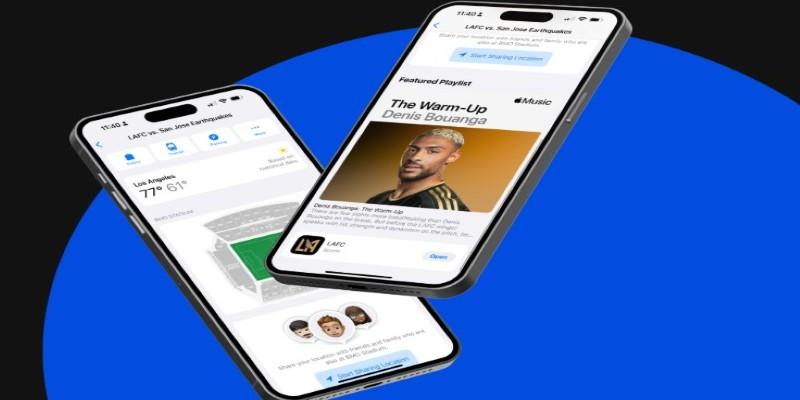
You can mute specific passes without removing them. Sports fans who keep season tickets avoid constant lock screen pop ups on game days when they are nowhere near the stadium. Some older pass formats cannot be muted and need to be reissued.
Haptic Typing Strength
The keyboard haptic response has finer control. Light touch typists can set a softer vibration that feels closer to laptop keys. Stronger settings drain a little more battery, especially during long text sessions.
App Store Rollback Option
Developers can allow temporary rollback to the previous app version. Users who run into a bug after an update can revert for a day while waiting for a patch. Developers choose whether to enable it, so not all apps support the feature.
Conclusion
iOS 26 is full of features that do not announce themselves loudly. They solve the annoying, repetitive moments we deal with every day, the ones too small to become selling points yet meaningful once handled properly. After exploring these twenty six additions, the update feels less like a cosmetic refresh and more like a set of quiet adjustments that let the phone behave with a bit more awareness of how you use it.